Utmost Pool Control
Technical System Manual
System Components Overview
Before exploring the interface, it is important to understand the four core components of the Utmost System:
1. The Master
The central brain of the operation. This is the external system located outdoors that directly controls all pool equipment.
2. Slave Screen
A dedicated physical touchscreen display (typically indoors) used to monitor and control the Master system.
3. App Slave
Your smartphone or device with the Utmost App loaded, acting as a remote control for the system.
4. Light Slave
An auxiliary system specifically dedicated to controlling the ambient lighting in the front yard of the house.
Event-Driven Renovalution & Fault Tolerance
This fail-safe architecture is the living embodiment of our Renovalution philosophy. The system operates purely on external real-world data and events, rather than relying on a traditional clock or calendar. By reacting intelligently to its environment instead of simply tracking time, the Master makes decisions autonomously.
Because every component operates completely independently, there is no single point of failure. If the App Slave loses connection, the Slave Screen continues to work flawlessly. If the Slave Screen is damaged, the Master keeps the pool running safely without interruption. It is a highly resilient ecosystem built for true reliability.
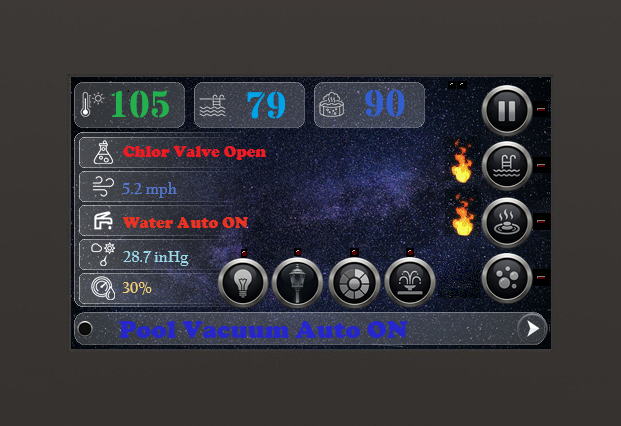
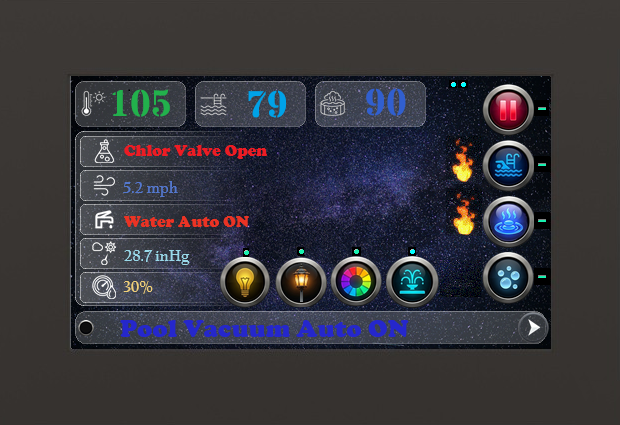
Status Indicators (LEDs)
Every control button is accompanied by a visual LED. A glowing LED confirms that the corresponding mode or equipment is currently active.Pause Timeout
For safety and continued filtration, Pause mode automatically cancels after 4 hours. The system will then resume its scheduled operation.Heating Priority
Upon pressing the Spa Heat or Pool Heat buttons (either from this screen or the mobile app), the system will automatically cancel any active manual modes (like Vacuum or Skim) to ensure heating always takes precedence.System Status Line (Screen 1, 2, 5)
Displays real-time operational feedback, active mode confirmations, and critical system alerts. It serves as the primary communication channel between the controller and the user.Master Command Secrets
- Heater Reset: 1 click on Heat Spa or Heat Pool button clears "HEAT STALL" error.
- Sync Modes (5x): 5 clicks on Post
Light, Color or Fountain to link them to the main pool lights.
(Button LEDs will flash to confirm)
Home Control Center
"This is the 'face' of your pool. All vital signs and primary controls are centralized here."
-
OUTSIDE temperature display.

-
POOL temperature display.

-
SPA temperature display.

-
Smart Pump LEDs: Indicate active operation of the Pool and Spa pumps (located near SPA temperature).

-
Atmospheric pressure display.

-
Displays Wind Speed and System Control by Wind Controller.

-
Outside humidity display.

-
Displays status or errors for the Chlorine system.

-
Display status or errors of Water system.

-
Press to pause the Pool System.

AUTO-CANCEL: Resumes after 4 hours. -
Press to turn on Pool heater control.

RESET: One click clears "POOL HEAT STALL" error (triggered after 25 min of no heat rise). -
Press to turn on Spa heater control (also turns on Bubbles).

RESET: One click clears "SPA HEAT STALL" error (triggered after 25 min of no heat rise). -
Press to turn Air Bubbles ON or OFF.

-
Press to control Main Pool Lighting.

-
Press to control Secondary Post/Pillar Lighting.

-
Press to manage Color Synchronization System.

-
Press to control Fountain Pump/Valve.

-
Press to navigate to the next screen.

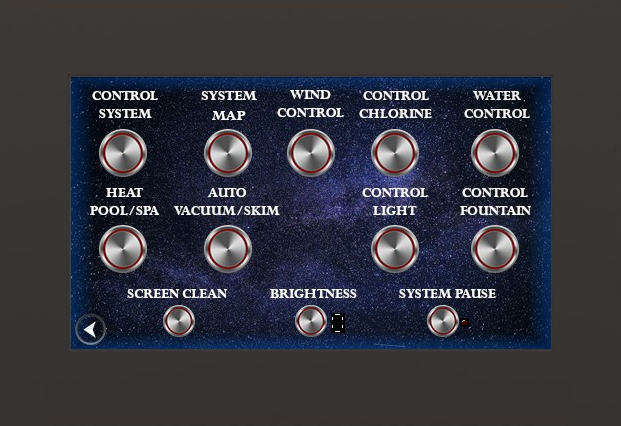
System Configuration
"Central command for advanced system architecture. Manage global operational parameters, calibrate precision sensors, and refine interface dynamics for peak performance."
- Control System Press to open Control System screen for manual equipment operation.
- System Map Press to open System Map screen to view real-time hydraulic flow.
- Wind Control Press to open Wind Protection settings for fountain safety.
- Control Chlorine Press to open Chlorine Control screen for sanitation management.
- Water Control Press to open Water Level screen to manage auto-fill settings and safety limits.
- Heat Pool/Spa Press to open Heating Setup screen to manage temperature targets.
- Auto Vacuum/Skim Press to open Auto-Cleaning screen to configure filtration timers.
- Control Light Press to open Lighting Design screen to manage ambient effects.
- Control Fountain Press to open specialized Fountain control interface.
- Screen Clean Press to open Screen Cleaning Mode (locks all touch input for 5 minutes).
- Brightness Press to adjust screen intensity manually (1-5).
- Pause System Press to immediately pause the entire pool system (automatically cancels after 4 hours).
-
Press to navigate to the previous screen.

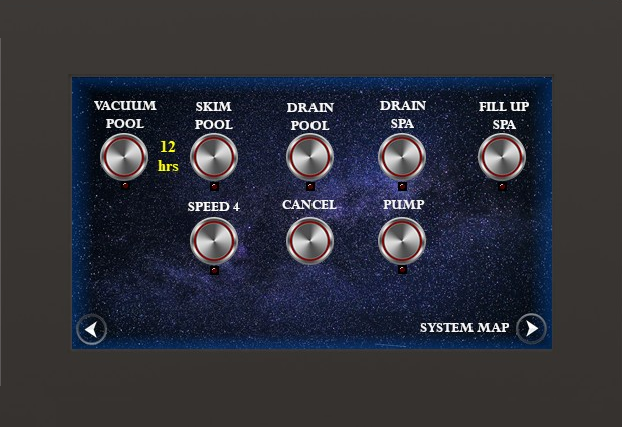
Pump Safety Protocol
When switching modes (e.g., from Skim to Vacuum), the pump deactivates for 15 seconds to allow valves to rotate safely. This prevents pipe damage from sudden pressure spikes.Safety Timeout
Manual modes (Vacuum, Skim, etc.) automatically reset after 12 hours of continuous operation. The system will then return to its automatic schedule.Pool Operation Control
"This interface provides five manual modes for precise water flow management. Direct hydraulic power exactly where it's needed for peak performance."
- Pump Press to manually activate or deactivate the primary circulation pump for the entire system.
- Vacuum Press to activate deep cleaning. Full pump power is diverted to the bottom vacuum port to effectively clean the bottom surface of the pool.
- Skim Press to start standard filtration. Water is drawn from the surface through skimmers to effectively remove floating debris and maintain water clarity.
- Fill Spa Press to fill the spa, replenishing water levels until the spillway is reached.
- Drain Pool / Spa Press to initiate drainage for water level adjustment or
maintenance.
Caution: Never fully drain the pool without professional consultation to prevent structural damage. - Max Speed Press to override the schedule and run the pump at 100% capacity. Ideal for rapid filtration.
- CANCEL Press to cancel all manual modes, deactivate equipment, and reset valves to return the system to automatic control.
System Status Indicators
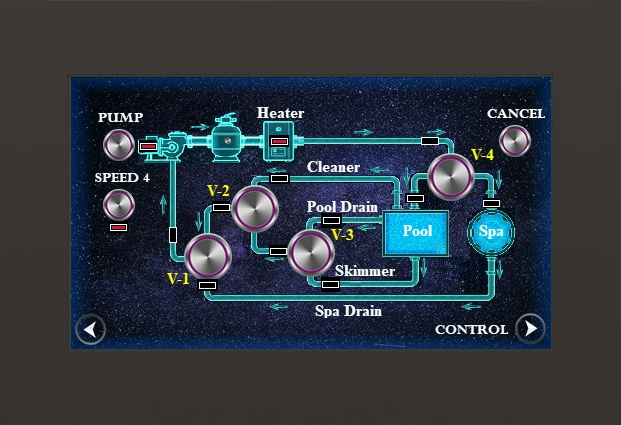
LEDs indicate valve states (ON/OFF) and visualize the current direction of water flow through the plumbing system.System Map (Pipe & Valves)
"Real-time visualization of hydraulic flow. If a valve is shown rotated on the map, the corresponding relay (#7 or #8) is active."
- Speed Press to turn all functions ON maximum speed (speed4).
- Pump Press to turn pump OFF or ON.
- Heater Displays whether heater is ON or OFF.
- Valve (V-n) 1, 2, 3, 4 Press a valve button to Manual Control the valve ON/OFF.
- Cancel Press to cancel all manual functions.
- Control Press to navigate to (Control screen).
Cleaning Speed Logic
- Vacuum: Starts with 10s of Speed 4 to clear any resistance, then transitions to Speed 1 for steady, efficient cleaning.
- Skim: Operates at Speed 2 for optimal surface tension management and debris removal.
Auto-Cleaning (Timers)
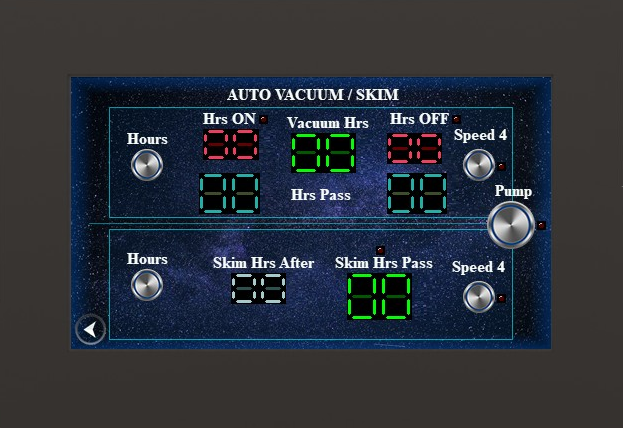
"Configure automated hygiene protocols to maintain pristine water quality. Intelligently manage the timing of bottom vacuuming and surface skimming cycles."
- — AUTO VACUUM —
- Hours Press to cycle through and select the desired number of operational hours for cleaning cycles.
- Vacuum Hrs Display the specific total hours per day the vacuum will operate.
- Hrs ON / Hrs OFF Displays the configured duration for the vacuum being active (ON) and inactive (OFF).
- Hrs Pass Progress tracker displaying the total hours elapsed during the current active or standby phase.
- — AUTO SKIM —
- Hours Press to choose the hours interval after which the surface skimming cycle cleaning begins.
- Skim Hrs After Displays the chosen hours interval after which the surface skimming cycle begins.
- Skim Hrs Pass Real-time counter showing the total duration of surface skimming completed.
- — COMMON CONTROLS —
- Speed Press to toggle the Maximum Speed (Speed 4) override ON or OFF.
- Pump Direct control to manually turn the circulation pump OFF or ON.
Intelligent Sequencing (Af.Pool)
When Af.Pool is active, the spa begins heating automatically as soon as the pool cycle completes. The system will maintain the spa temperature for 1 hour after reaching the target, then return to normal filtration.
Efficiency Reset (KPI)
To reset the heating efficiency memory (KPI) for the adaptive thermostat, press the Cancel button 5 times rapidly while on this screen.
Heating Indicators (LEDs)
The LEDs located directly above the temperature digits provide a real-time "heartbeat" of the heating process:
- Slow Blink: Heating active; water is far from the target.
- Fast Blink: Heating active; water is approaching the target.
- Steady ON: Target temperature has been successfully reached.
Numeric Display Logic
- Steady: Displaying real-time temperature.
- Blinking: Heating active (Heater Relay ON).
- Slow Pulse: Target reached, standby mode.
Heating Setup
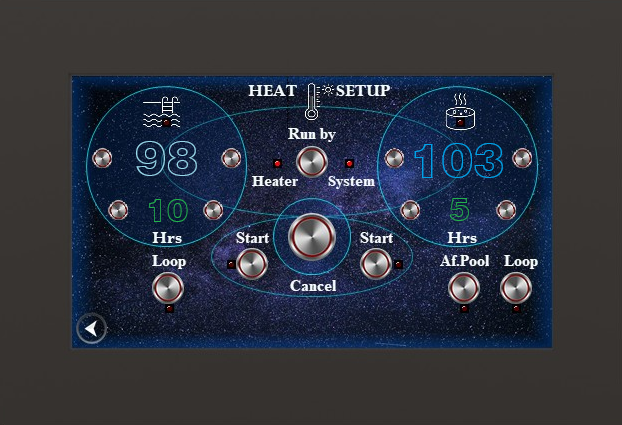
"Advanced thermal management for Pool and Spa. Schedule precise heating cycles or utilize sequential logic to maintain perfect water temperature."
- — POOL HEATING —
- Heat Pool-t Use the Left (-) and Right (+) buttons next to the pool temperature display to set your target heat level. (Max: 40.6°C / 105°F).
- Heat Pool After Hrs Use the Left (-) and Right (+) buttons to set the delay interval. Example: If it is 1 PM and you want to start heating at 5 PM, set the timer to 4 hours.
- Start Press to begin the countdown timer for the pool heating schedule.
- Loop Enable 24-hour recurrence; the pool will automatically re-heat every 24 hours starting from the initial activation.
- — SPA HEATING —
- Heat Spa-t Use the Left (-) and Right (+) buttons next to the spa temperature display to set your target heat level. (Max: 40.6°C / 105°F).
- Heat Spa After Hrs Use the Left (-) and Right (+) buttons to set the delay interval. Example: If it is 1 PM and you want to start heating at 5 PM, set the timer to 4 hours.
- Start Press to begin the countdown timer for the spa heating schedule.
- Loop Enable 24-hour recurrence; the spa will automatically re-heat every 24 hours starting from the initial activation.
- Af.Pool Sequential mode: Spa heating starts after pool finishes. (Note: Use this instead of Spa Loop).
- Bubbles Press to toggle Air Bubbles ON or OFF. Bubbles automatically activate during Spa heating to ensure optimal heat distribution.
- — THERMOSTAT MODE —
- Run by Heater/System Toggle between System (managed by the Utmost controller) and Heater (managed by the heater's internal thermostat). Use System mode for precision control using our high-end sensors.
- — SYSTEM ACTION —
- Cancel Press to immediately terminate all active or scheduled heating tasks for both pool and spa.
Boot Sequence (Auto-Fill)
Note: After a system restart, the controller automatically initiates a fill cycle. If the sensor is healthy, the cycle completes after 5 minutes. If a sensor fault is detected, you will receive a "Check water level" notice immediately.
Pro Tip: Skip Timer
You can finish filling the pool immediately without waiting for the 5-minute safety delay by pressing the Off button and then the Auto button.
Water Level (Auto-Fill)
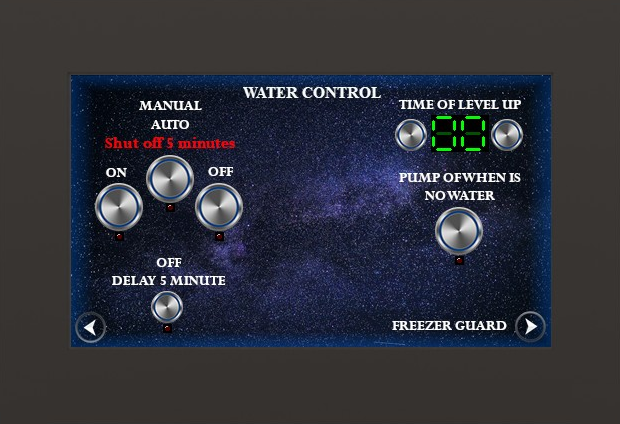
"Maintain the perfect water line with intelligent automation. Sophisticated wave-filtering and safety protocols prevent flooding and protect your equipment."
Pro Tip: Sensor Placement
For the most accurate water level readings and optimal operation of the wave-filtering algorithm, it is highly recommended to place the water sensor inside the skimmer.
- — AUTOMATION —
- Manual ON/OFF Press On or Off to manually start or stop water flow to the pool.
- OFF Delay 5 min Toggle the 5-minute delay timer. When active, water continues to run for 5 minutes after the sensor is satisfied.
- PUMP OFF (Low Water) When enabled, the system will automatically shut down the pump if a critically low water level is detected.
- — CONFIG & NAVIGATION —
- TIME OF LEVEL UP Set the maximum allowed fill time. If filling takes longer than this limit, you will receive a "Check water level" notice.
- Freeze Guard Press to navigate directly to the Freeze Guard configuration screen.
Water Purity & Protection
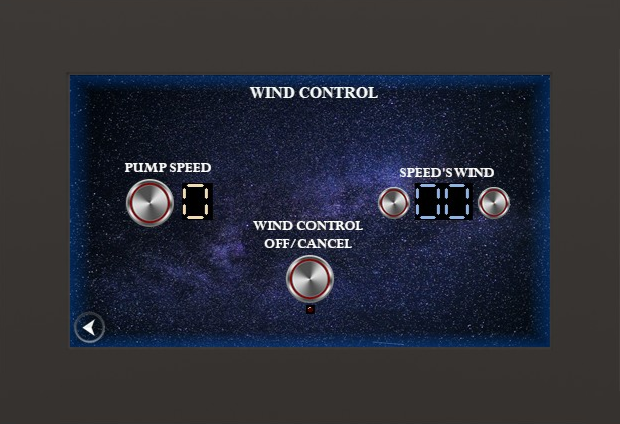
During high winds, the system automatically adjusts its operation to maintain water clarity and prevent debris accumulation. This proactive management ensures your pool remains clean and your water chemistry stays balanced even in challenging weather conditions.
Wind Control
"Intelligent wind monitoring for environmental harmony. Clean your pool's water by automatically adjusting features during high-wind conditions."
- — DETECTION —
- Wind Speed
- Real-time monitoring of current wind velocity as measured by the external anemometer.
- SPEED'S WIND Use the Left and Right buttons to set the wind speed limit (threshold) at which the system will engage. (Typical setting: 18 km/h or 12 mph).
- — CONTROL —
- Auto Wind Control
- Master toggle to enable or disable the automatic wind safety system.
- Pump Speed Select the specific pump speed (Speed 1–4) the system should automatically UP to when the wind exceeds your threshold.
- Cancel Override and dismiss the active Control state to return the pool system normal operational speed.
Sensitivity Calibration
To calibrate your system for perfect timing:
1. Observe: During sunset, watch the Sensor Level as it naturally increases.
2. Set ON Point: When the darkness is exactly at your preferred level, note the number
and set your ON Level to match.
Hardware Auto-Calibration:
To reset the sensor's baseline (zero point), press the Auto Control button 5 times
within 6 seconds. The system will capture the current ambient light as the new "zero" reference.
(Note: 99 is complete darkness; 0 is bright daylight).
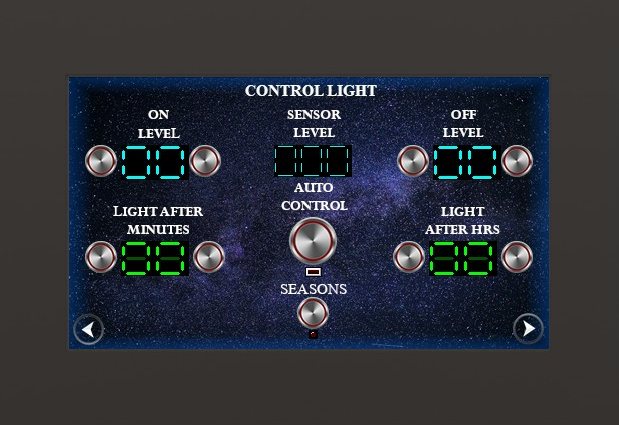
Control Light
"Sophisticated ambient management. Transform your pool's atmosphere automatically using precision light sensors and intelligent scheduling."
- — DETECTION —
- Sensor Level Displays the current light sensitivity measured by the sensor (0–99).
- — TRIGGER LEVELS —
- ON Level Use the Up and Down buttons to set the sensor sensitivity level that will trigger the lights to turn ON.
- OFF Level Use the Up and Down buttons to set the sensor sensitivity level that will trigger the lights to turn OFF.
- — TIMING & AUTOMATION —
- ON Light after Minutes Use the Up and Down buttons to set a delay (in minutes) after the "ON Level" is reached before activation.
- OFF Light after Hrs Use the Up and Down buttons to select how many
hours the lights will remain ON before automatically turning off.
Note: Setting this to 0 or 15 activates "Wait for Dawn" mode. The timer is bypassed, and lights will turn off only when the sun rises (sensor level exceeds the OFF Level). - Seasons Enable Seasonal Adjustment. When active, the system automatically recalculates the ideal lighting duration based on the actual length of the night throughout the year.
- Auto Control Press the button to enable or disable the automatic sensor-based lighting schedule.
Circadian Comfort
The system uses the light sensor to automatically transition the display between your preferred daytime and nighttime intensities. This ensures the screen is readable in the sun and gentle on the eyes at night.
Intensity Levels
- Level 5: Maximum brightness (High Noon).
- Level 1: Minimum brightness (Night Comfort).
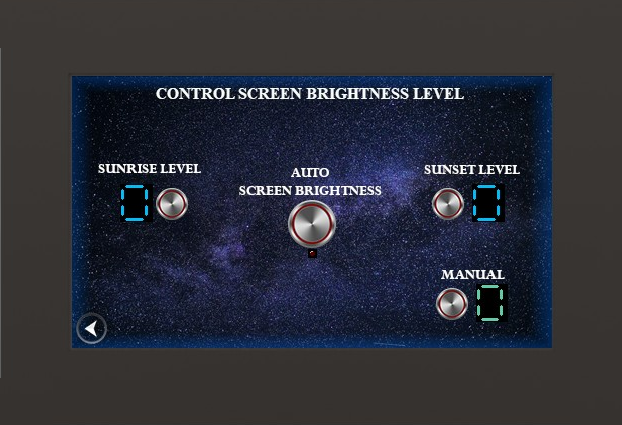
Control Screen Brightness
"Intelligent display management. Ensure perfect visibility in bright sunlight and gentle comfort at night with automated brightness scheduling."
- — AUTOMATED MODES —
- Sunrise Level Select the display brightness after sunrise (Levels 1–5). Level 5 is the brightest.
- Sunset Level Select the display brightness after sunset (Levels 1–5). Level 1 is the dimmest.
- Auto Screen Brightness Press to enable or disable automatic switching between Sunrise and Sunset brightness levels.
- — MANUAL CONTROL —
- Manual Set the screen brightness manually (Levels 1–5). (Note: Manual adjustments override Auto-Brightness until the next sensor event).
Cold Water Protection
To protect your electrolytic cell, the system includes a Cold Water Shut-off feature.
Activation: Press the Auto button 5 times.
When active, the system automatically disables chlorine production if the water temperature
drops below 60°F (15.5°C). You will see a flashing "SHUT-OFF When Cold Water"
alert.
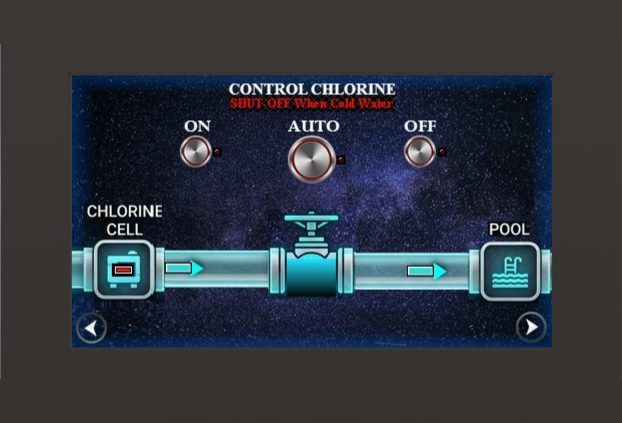
Control Chlorine
"Electrolytic cell management. Monitor salt levels and control chlorine production output with intelligent environmental safeguards."
- — CONTROL —
- On / Off Manually open or close the chlorine production valve/system.
- Auto Enable automatic control based on the internal dosing timer and safety sensors.
- — STATUS & FEEDBACK —
- Cell Status Real-time indicator showing whether the chlorine electrolytic cell is
currently generating chlorine.
Note: Cell shows "ON" when current is 4.31 Amps and "OFF" when current is less than 4.31 Amps. - Information Line A dedicated text line providing live system status, active modes, or safety alerts.
- Leds Visual feedback indicators for system health and production status.
Safety & Shutdown
The Chlorine System automatically shuts off if the water temperature drops below 60°F
(15.5°C).
A 10-minute stabilization delay is applied before the system executes a cold-weather shutdown to
ensure accurate sensor readings.
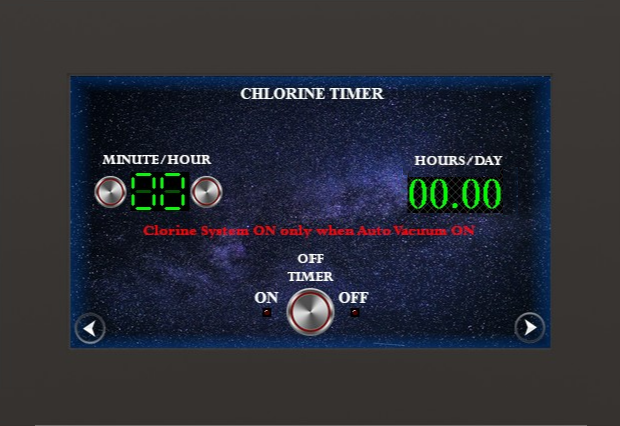
Chlorine Timer
"Precision chemical management. Control the duty cycle of your chlorine production to maintain perfect water balance."
- — CONFIGURATION —
- Minutes / Hour Select how many minutes the chlorine system will run during each hour of Auto Vacuum operation. Use Up and Down to adjust.
- Timer Press to enable or disable the automated dosing schedule.
- — PREDICTIONS —
- Hours / Day Displays the total calculated hours per day that the system will produce chlorine, based on your active Auto Vacuum schedule.
- — NAVIGATION —
- Back / Next Navigate between the Chlorine Control and Salt Laboratory (Cell Info) screens.
Health Monitoring
The Present Level provides a real-time health score of your cell.
If this number drops significantly below your "Good Level" (baseline), it indicates
either scaling on the plates or cell degradation.
Note: For accurate readings, always check this value 7-10 minutes after the system has been
running.
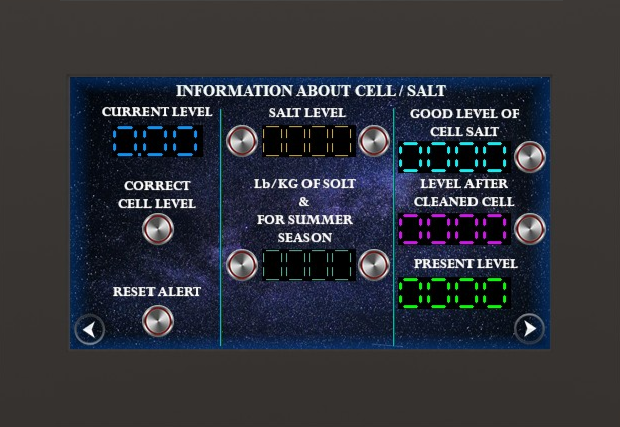
Information about Cell / Salt
"Deep diagnostics. Monitor electrical efficiency, salt concentrations, and cell longevity with temperature-compensated precision."
- — CALIBRATION & SETUP —
- Good Level of Cell/Salt Press the button to remember after installing a new cell to establish the "New Cell" level of salt production for your specific pool.
- Level after Cleaned Cell Press the button by the display to remember after cleaning the cell level of the salt.
- — LIVE METRICS —
- Current Level Real-time electrical current (Amps) currently flowing through the electrolytic cell.
- Salt Level (PPM) Press buttons by the display to remember your latest manual test strip result (recommended: 2700–3400 PPM). This value is stored for your reference and comparison.
- Lb / Kg of Salt Press buttons by the display to log salt added. Double-click the Right button to toggle between "Current Salt Added" and "Seasonal Goal" (display blinks to confirm).
- Present Level Real-time efficiency metric. A lower number indicates scaling or degradation.
- — CONTROLS —
- Reset Alert Manually clears the "Check Cell/Salt" alert from the main screen. The system will also automatically clear this alert if it detects 20 minutes of stable production.
- Back / Next Navigate between the Chlorine Timer and Home screens.
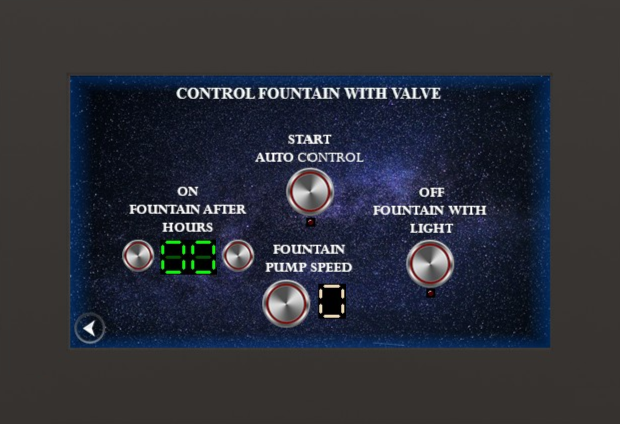
Control Fountain with Valve
"Integrated water aesthetics. Enabled when hardware switch SW1/6 is in position 0 (OFF). Synchronize your fountain with pool lighting and optimize flow with main pump speed controls."
- Auto Control Press to enable or disable automated fountain logic, allowing the system to manage the valve based on timers and environmental triggers.
- OFF Fountain after Hrs Press Up and Down buttons to select how many hours until the fountain is automatically turned Off after it was manually turned On.
- OFF Fountain with Light Press to turn On or Off fountain and light together automatically.
- Speed Press to set the specific pump speed (1–4) required to achieve the desired water height and flow when the fountain valve is active. Note: This setting controls the speed of the Main Pool Pump.
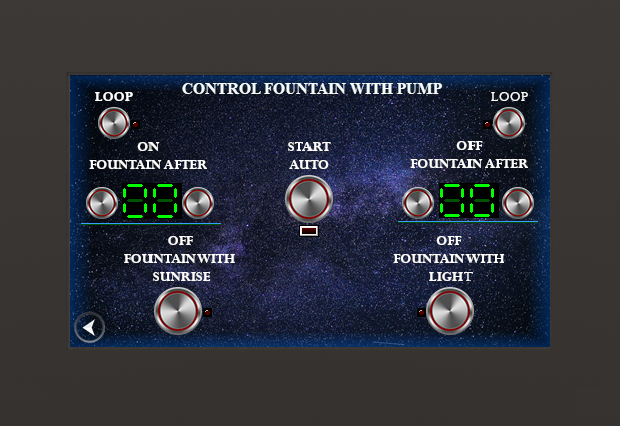
Control Fountain with Pump
"Dedicated pump scheduling. Enabled when hardware switch SW1/6 is in position 1 (ON). Orchestrate complex water displays with astronomical timing, synchronized lighting, and 24-hour repetition cycles."
- — SCHEDULING MODES —
- Start Auto Control Press to activate the current countdown and loop configuration.
- ON Fountain after Hrs Set the delay (in hours) before the fountain turns ON.
Ex: If it is 8 AM and you want it ON at 11 AM, set to 3 hrs. - OFF Fountain after Hrs Set the duration (in hours) the fountain stays ON before automatically stopping.
- Loop Enables daily repetition. When active, the system repeats your ON/OFF schedule every 24 hours.
- — AUTOMATION SYNC —
- Auto Control with Sunrise Syncs activation with the break of dawn. If ON after Hrs is 0, it starts exactly at sunrise. Note: Sunrise/Sunset events are calibrated on Screen 9 (OFF Level = Sunrise, ON Level = Sunset).
- OFF Fountain with Light Synchronizes the fountain's shutdown with the pool lighting system.
- — OPERATIONAL RULES —
- • Exclusivity: "Loop" and "OFF after Hrs" are bypassed if Sunrise or Light automation is active. These modes override delay timers as the system switches to direct sensor-driven control.
- • Stability: If the system restarts, you must press Start Auto Control to resume the countdown.
- • Safety: The ON time and OFF time values must never be identical.
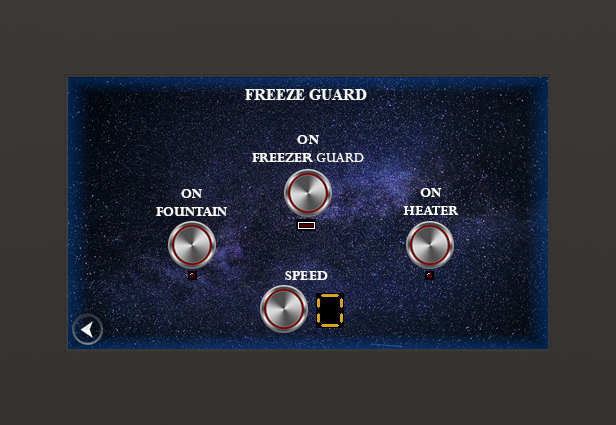
Freeze Guard
"Automated cold-weather defense. Protect your investment by ensuring constant water movement and heat distribution when temperatures approach freezing."
- ON Freeze Guard Press to enable or disable the master freeze protection logic. When active, the system monitors water temperature 24/7.
- ON Fountain Press to allow the fountain to automatically activate during freeze events, keeping the water feature lines from freezing.
- ON Heater Press to enable automated heating during freeze events. The system will maintain a safe minimum temperature to protect the equipment.
- Speed Press to select the specific pump speed (1–4) the system will use while in Freeze Guard mode to ensure high-velocity flow.
- Note: Freeze Guard activates automatically when water temperature drops below 38°F (3°C). The system rotates through all valve circuits every 30 minutes to prevent ice formation in any branch.
- • Manual Priority: Any manual mode (Heater, Skim, Vacuum) will override Freeze Guard control. However, Freeze Guard remains active in the background and will resume automated protection as soon as manual modes are turned off.
- • Schedule Priority: Freeze Guard takes priority over automated heating schedules. Scheduled pool or spa heating will be bypassed during freeze events to ensure the system can continue rotating through all pipes to prevent ice formation.
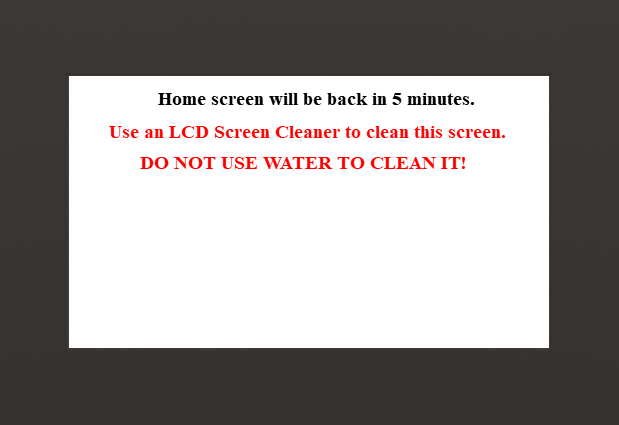
Screen Cleaning Mode
"Safe maintenance interface. Temporary touch-lock and high-contrast display for precise panel cleaning without accidental triggers."
- 5-Minute Lockout Once activated, all touch sensors are disabled for 300 seconds to allow for physical wiping.
- High-Contrast White Displays a pure white screen to reveal every fingerprint and smudge clearly.
- Safety Note: Use only dry micro-fiber cloth. Never use water or chemicals on the capacitive display.

Welcome Screen
"System initialization. The heart of the Utmost brand experience, featuring identification and diagnostics."
- Brand Identity Displays the signature squirrel logo and software version during the boot sequence.
- Initialization Verifies network connectivity and sensor integrity before allowing full system control.
- Diagnostics Technical build identifiers are visible at the base of the screen for service confirmation.
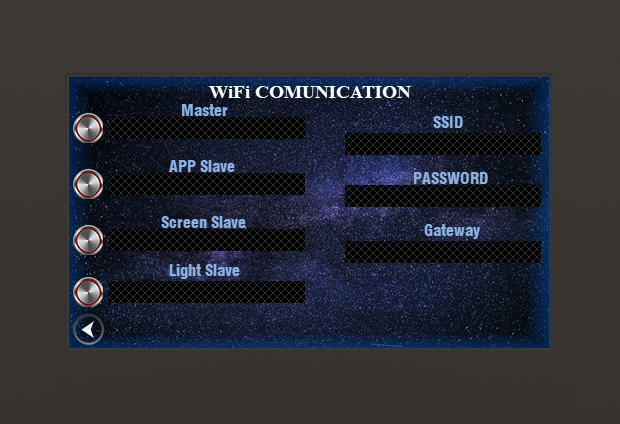
Smart Pairing & System Recovery
"Comprehensive connectivity guide. How to pair, reset, and recover devices in any situation."
1. Standard UI Pairing (With Screen)
This is the safest method. On Form 20, tap Master (shows SELECT DEVICE) to unlock. Then tap Reset Screen. The system deletes the old screen and opens a 2-minute "Pairing Window" (PAIRING 2 min). Turn on a new Screen, and it will pair automatically.
2. Hardware Reset (Without Screen)
If the screen is broken, you can use the physical 'Reset' buttons on the Wemos boards (press quickly within 8 seconds):- Master: 4 Clicks - Soft Reset. Opens 2-min pairing window but keeps the old screen in memory.
- Master: 6 Clicks - Hard Reset. Wipes old screen memory entirely and opens 2-min window.
- Slave (Screen): 4 Clicks - Soft Reset. Temporarily forgets old Master to attempt new pairing.
- Slave (Screen): 6 Clicks - Hard Reset. Wipes memory completely (Clean Slave).
3. Auto-Recovery (If a Board Burns Out)
- Master burned out: Flash a new Master and turn it on. Its memory is completely empty. Turn on your old Screen. The new Master will automatically accept the old Screen instantly without ANY button presses!
- Screen burned out: Open a 2-min pairing window on the Master (via Form 20 or 6 Hardware clicks). Turn on the new (clean) Screen. They will pair instantly.
4. Phone App Navigation & Pairing
App Navigation Guide:
- Wi-Fi Icon (with bars): Tap this icon to open the general Network Information menu. This is your central hub for all settings, pairing, and Wi-Fi configuration.
Color Indicators: The color of the bars shows your signal strength to the Master. Green = Excellent signal, Yellow/Orange = Fair/Weak signal, Red or Gray = Poor signal or Disconnected. - Connection Icon: Tap this icon to manually refresh your connection status or force a reconnection to the system. Detailed action: When tapped, the App sends a direct status request to the Master. If the system is paired and responds, the icon will turn Green to confirm a successful connection. If there is no response, the icon will turn Red, indicating that you should check your phone's Wi-Fi settings to ensure you are connected to the Master's network.
To control the pool from your phone, connect your device directly to the Master's local Wi-Fi network (no home internet or router is needed). Open the App, enter the Wi-Fi name and password if they were changed from the default values (Default SSID: WemosSender, Password: wemos1234), and it will automatically pair and display the connection status. (Tip: Tap the "eye" icon next to the password field to see what you are typing).
(See Phone Pairing Status below)
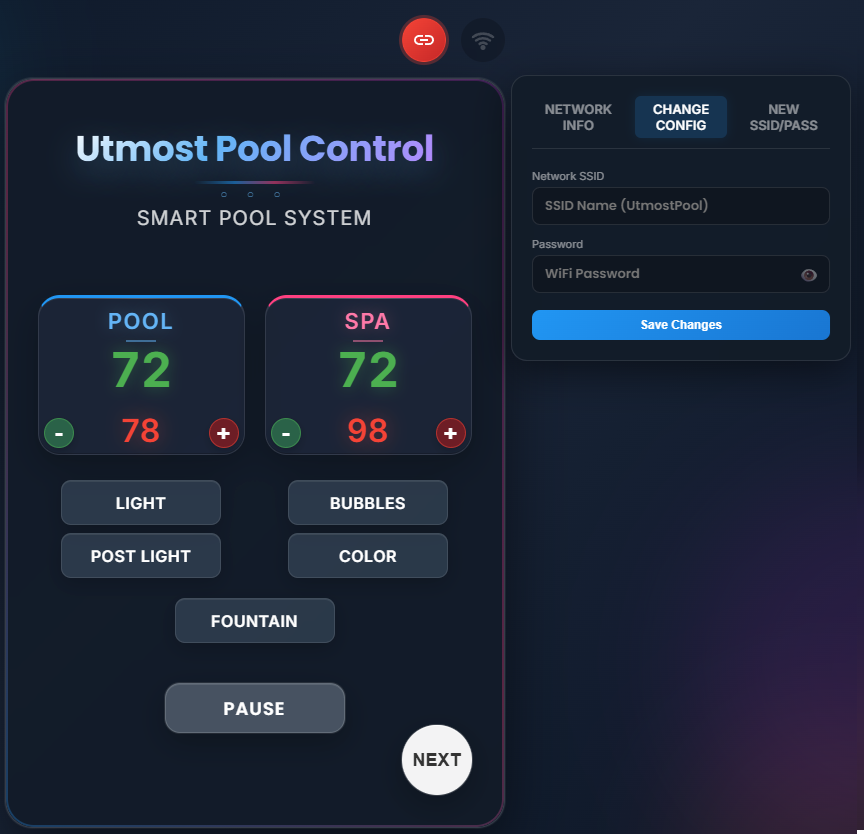
5. Customizing System Wi-Fi
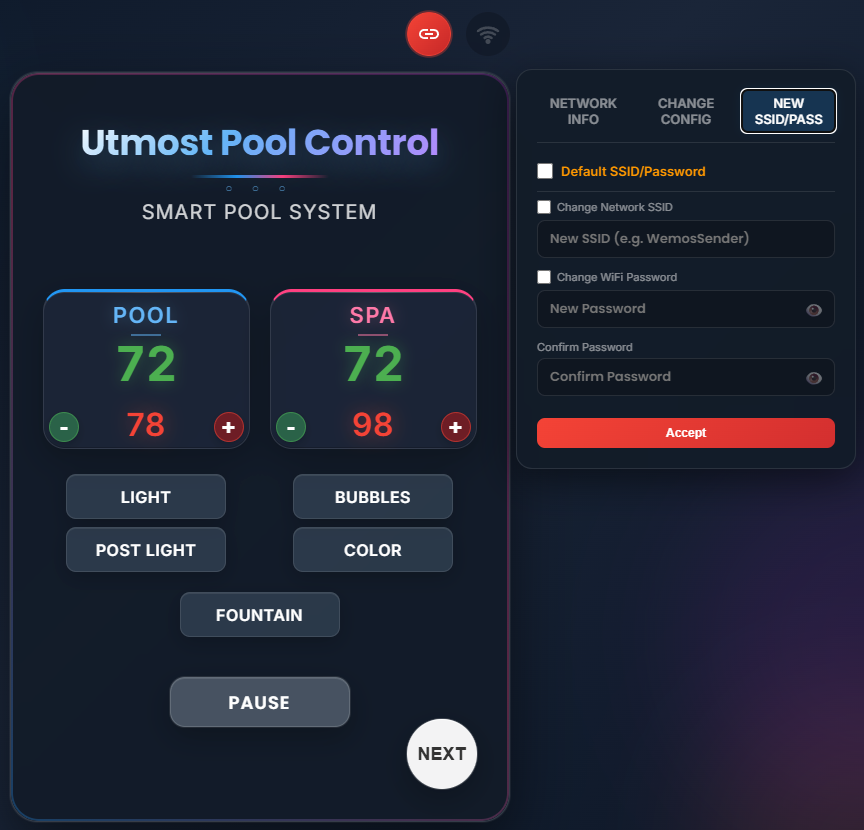
If you want to change the default Wi-Fi name or password that the Master broadcasts, open the App and go to the Settings tab. Check the boxes next to the fields you want to update, enter a New SSID & Password, and tap Accept. The Master will save these new credentials and restart, broadcasting its own private network with your new custom name. (Tip: Tap the "eye" icon next to the password field to see what you are typing).
- Checkboxes: To change a value, you must check the box next to the SSID or Password field before entering the new text.
- Partial Updates: You can change only the Name, only the Password, or both together by selecting the corresponding checkboxes. Unchecked fields will remain unchanged.
- Reset to Default: To revert the system back to factory settings, simply check the Default SSID/Password box and tap Accept. The system will automatically restore the default values (
WemosSenderandwemos1234).
(See Wi-Fi Settings Interface below)
6. IP Address & Network Architecture
The system does not require modifying any of its core IP addresses. Because all devices operate within a closed, local group and are strictly bound to their specific Master during the pairing process, multiple devices (or even entirely separate pool systems nearby) sharing the exact same IP address will not conflict with one another.
Clock Drift Precision
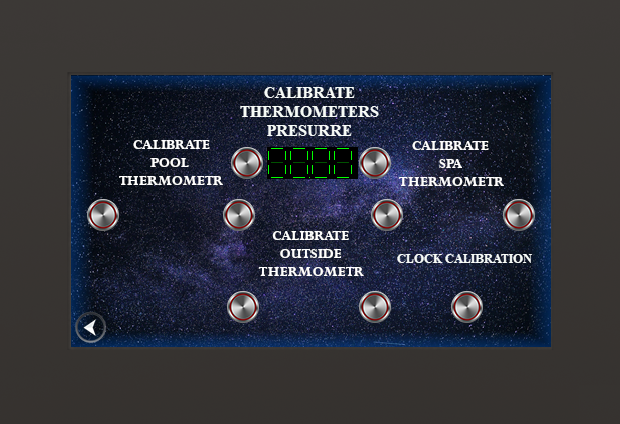
1. Press Start at 12:00 PM.
2. Wait 24 hours.
3. Press Stop.
Corrects daily schedule drift by synchronizing the crystal oscillator. The system automatically determines the elapsed time; the longer the duration, the higher the precision.
? Hidden Master Commands
The system features concealed multi-tap combinations for expert-level diagnostic and recovery. Tap rapidly (interval < 1.5s).
- Fountain Sync 5 clicks on Fountain (Form 0). Enables "Auto-Link" — fountain state will mirror the main lighting.
- Heater Master Reset 5 clicks on "Cancel All" (Form 2). Purges heating efficiency memory and clears persistent locks.
- Time Reset 5 clicks on Calibration (Form 5). Reverts clock precision to factory baseline.
- Lighting Auto-Sync 5 clicks on Post Light or Color (Form 0). Enables automatic synchronization with main lighting.